Notes on iOS Networking
AFNetworking is a well-known Objective-C networking library built on top of
NSURLSession, Apple's networking foundation introduced with iOS 7. This article follows a request through AFNetworking 3.2.1 to understand what that wrapper actually provides.
The AFNetworking 3.x Structure
The AFNetworking 3.2.1 source can be summarized with the following architecture:
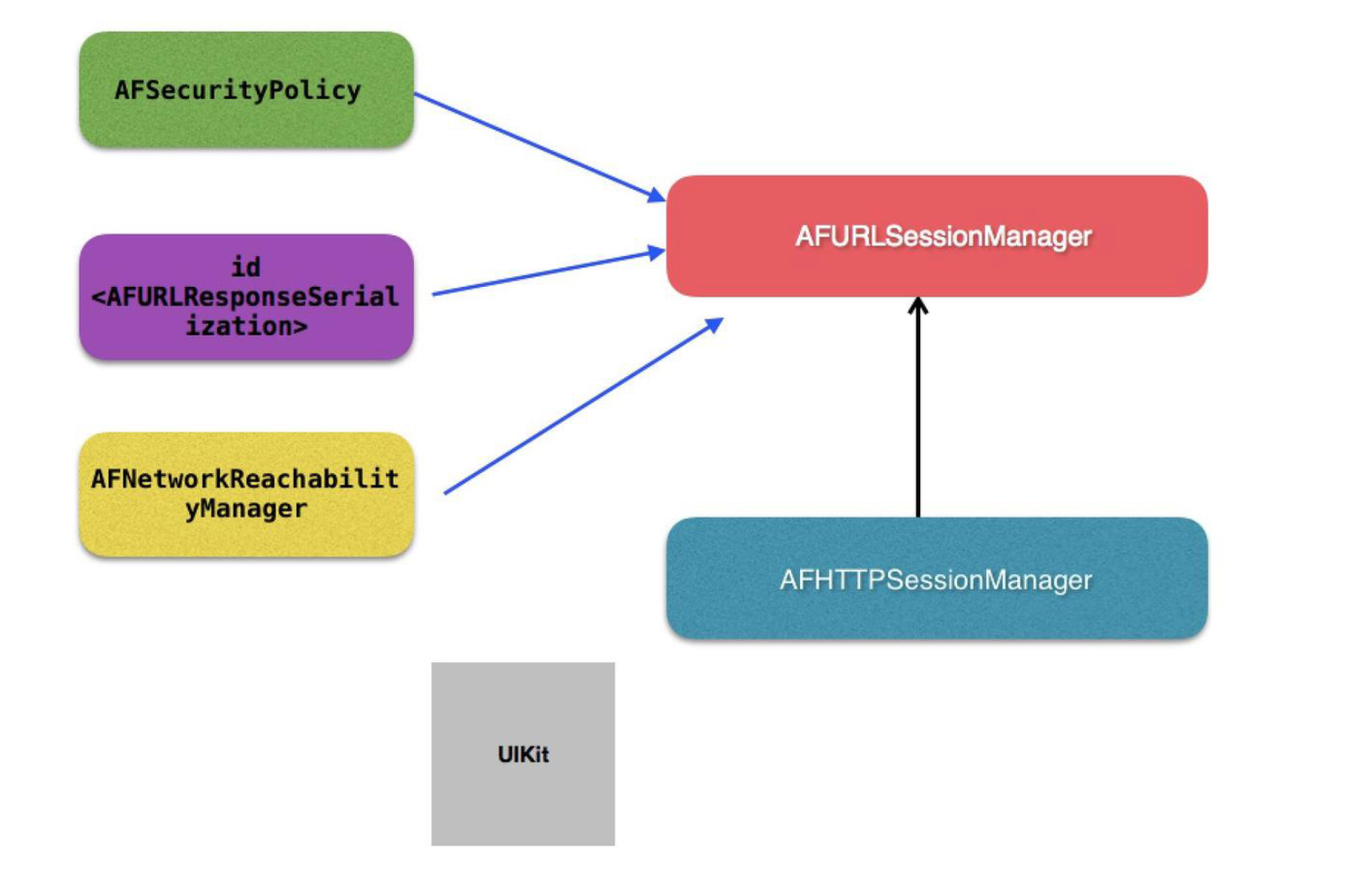
AFHTTPSessionManager inherits from AFURLSessionManager. The latter provides the core session and task-management behavior, while neighboring components handle request serialization, response serialization, network reachability, and security policy.
An application using the library usually needs only the API exposed by AFHTTPSessionManager, and the official repository documents that surface well. That is enough for ordinary use. Understanding the internals becomes more useful when adapting the library or designing a networking layer with similar responsibilities.
A complete reading of the project would be too broad for one article, so this walkthrough follows a single GET request from the application-facing API down to task creation.
What Happens During a GET Request?
The request begins by creating an AFHTTPSessionManager, configuring its serializers, and calling GET:
AFHTTPSessionManager *manager = [AFHTTPSessionManager manager];

manager.requestSerializer.timeoutInterval = 10;
manager.responseSerializer.acceptableContentTypes = [NSSet setWithObjects:@"application/json", @"text/json", @"text/javascript", @"text/html", @"text/plain", nil];

[manager GET:@"https://app.chaoaicai.com/api/todayApi/discoveryInfo.app" parameters:@{@"name": @"kelvin"} progress:nil success:^(NSURLSessionDataTask * _Nonnull task, id  _Nullable responseObject) {
    NSLog(@"%@", task);
} failure:^(NSURLSessionDataTask * _Nullable task, NSError * _Nonnull error) {
    NSLog(@"%@", error);
}];
The example sets a ten-second timeout and defines the response content types it accepts. The request API then receives a URL, parameters, progress callback, success callback, and failure callback.
Calling the public API is straightforward. The interesting part is what happens next:
- (NSURLSessionDataTask *)GET:(NSString *)URLString
                   parameters:(id)parameters
                     progress:(void (^)(NSProgress * _Nonnull))downloadProgress
                      success:(void (^)(NSURLSessionDataTask * _Nonnull, id _Nullable))success
                      failure:(void (^)(NSURLSessionDataTask * _Nullable, NSError * _Nonnull))failure
{
    NSURLSessionDataTask *dataTask = [self dataTaskWithHTTPMethod:@"GET"
                                                        URLString:URLString
                                                       parameters:parameters
                                                   uploadProgress:nil
                                                 downloadProgress:downloadProgress
                                                          success:success
                                                          failure:failure];

    [dataTask resume];

    return dataTask;
}
The method creates a data task through dataTaskWithHTTPMethod:..., resumes it, and returns it to the caller. Returning the task gives the application a handle for later cancellation or observation.
- (NSURLSessionDataTask *)dataTaskWithHTTPMethod:(NSString *)method
                                       URLString:(NSString *)URLString
                                      parameters:(id)parameters
                                  uploadProgress:(nullable void (^)(NSProgress *uploadProgress))uploadProgress
                                downloadProgress:(nullable void (^)(NSProgress *downloadProgress))downloadProgress
                                         success:(void (^)(NSURLSessionDataTask *, id))success
                                         failure:(void (^)(NSURLSessionDataTask *, NSError *))failure
{
    NSError *serializationError = nil;
    NSMutableURLRequest *request = [self.requestSerializer requestWithMethod:method URLString:[[NSURL URLWithString:URLString relativeToURL:self.baseURL] absoluteString] parameters:parameters error:&serializationError];
    if (serializationError) {
        if (failure) {
            dispatch_async(self.completionQueue ?: dispatch_get_main_queue(), ^{
                failure(nil, serializationError);
            });
        }

        return nil;
    }

    __block NSURLSessionDataTask *dataTask = nil;
    dataTask = [self dataTaskWithRequest:request
                          uploadProgress:uploadProgress
                        downloadProgress:downloadProgress
                       completionHandler:^(NSURLResponse * __unused response, id responseObject, NSError *error) {
        if (error) {
            if (failure) {
                failure(dataTask, error);
            }
        } else {
            if (success) {
                success(dataTask, responseObject);
            }
        }
    }];

    return dataTask;
}
This method accepts the HTTP method, URL, parameters, progress callbacks, and completion callbacks. It asks the request serializer to build an NSMutableURLRequest. If serialization fails, AFNetworking dispatches the failure callback onto its configured completion queue, or the main queue when no custom queue exists.
After serialization succeeds, the manager creates the NSURLSessionDataTask and converts the lower-level completion handler into the public success and failure callbacks.
- (NSURLSessionDataTask *)dataTaskWithRequest:(NSURLRequest *)request
                               uploadProgress:(nullable void (^)(NSProgress *uploadProgress))uploadProgressBlock
                             downloadProgress:(nullable void (^)(NSProgress *downloadProgress))downloadProgressBlock
                            completionHandler:(nullable void (^)(NSURLResponse *response, id _Nullable responseObject, NSError * _Nullable error))completionHandler
{
    __block NSURLSessionDataTask *dataTask = nil;
    url_session_manager_create_task_safely(^{
        dataTask = [self.session dataTaskWithRequest:request];
    });

    [self addDelegateForDataTask:dataTask uploadProgress:uploadProgressBlock downloadProgress:downloadProgressBlock completionHandler:completionHandler];

    return dataTask;
}
Execution has now moved into AFURLSessionManager. Request construction and serialization happened in AFHTTPSessionManager; this layer is responsible for creating and managing the task.
The url_session_manager_create_task_safely block initializes a task from the serialized request, then addDelegateForDataTask:... associates AFNetworking's delegate object with it. The actual task creation API belongs to Foundation:
/* Creates a data task with the given request. The request may have a body stream. */
- (NSURLSessionDataTask *)dataTaskWithRequest:(NSURLRequest *)request;
AFNetworking creates an AFURLSessionManagerTaskDelegate for the task. Its declaration shows that it participates in the session task, data, and download delegate protocols:
@interface AFURLSessionManagerTaskDelegate : NSObject <NSURLSessionTaskDelegate, NSURLSessionDataDelegate, NSURLSessionDownloadDelegate>
The delegate is initialized with the task:
- (instancetype)initWithTask:(NSURLSessionTask *)task;
This object gathers task state, translates delegate events into progress and completion callbacks, and separates per-task behavior from the session manager itself.
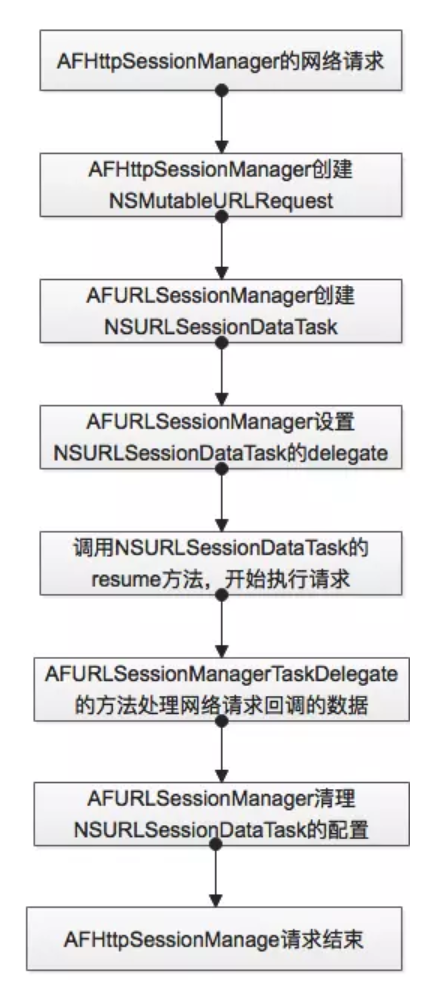
The end-to-end request flow can be summarized with the following diagram:
Ideas for a Networking Layer Built on AFNetworking
Before optimizing the layer, it helps to map AFNetworking's objects to the underlying HTTP and URL Loading System concepts. AFHTTPSessionManager owns an NSURLSession, creates requests through serializers, creates tasks, and schedules those tasks on the session.
Repeatedly creating managers is usually unnecessary. A shared or otherwise long-lived manager allows the underlying NSURLSession to reuse connections according to system policy. A project can centralize that manager in a networking client rather than constructing one for every request.
The maximum number of concurrent operations can also be constrained through the session manager's operation queue when the product requires serialized or bounded execution:
self.operationQueue = [[NSOperationQueue alloc] init];
self.operationQueue.maxConcurrentOperationCount = 1;
Connection reuse and pipelining behavior ultimately depend on NSURLSessionConfiguration, the protocol, and server support. A configuration can request HTTP pipelining where appropriate:
if (!configuration) {
    configuration = [NSURLSessionConfiguration defaultSessionConfiguration];
}
self.sessionConfiguration.HTTPShouldUsePipelining = YES;
self.configuration = configuration;
The larger lesson is that AFNetworking does not replace Apple's networking stack. It organizes request construction, serialization, task delegation, progress reporting, and completion handling around NSURLSession, giving applications a smaller and more consistent API surface.