An animation looks right in the curve editor. Then a cut introduces a jump, a speed change shifts its timing, or the exported video lands one frame late.
These failures look like interpolation bugs. Often, they are disagreements about what the same data means: which clock a keyframe belongs to, when a frame is sampled, or which layer applies the easing curve.
Keyframes cross the client, the media engine, and the rendering engine. The formula is the small part. The engineering challenge is to make every consumer evaluate the same value at the same time. This article develops a design for that contract, starting with a curve you can manipulate yourself.
Two keyframes, all the frames between
A keyframe records a property value at a particular time. For example, position might be 0 at the start and 100 two seconds later. The editor must supply the values in between.
With linear interpolation, half the time means half the distance. Easing changes that relationship: an object can start slowly, accelerate, settle gently, or travel beyond its final position before returning. The endpoints stay the same; the journey changes.
Try Ease in at frame 15. One quarter of the time has passed, but the object has covered less than a quarter of the distance. Switch to Linear without moving the playhead to compare. Then choose Overshoot and scrub toward the end: the position can exceed 100 before returning to it.
Shape the in-between.
Drag the handles or adjust the sliders. Scrub time to see the exact value at each frame.
x stays between 0 and 1. y can go beyond the endpoints to create anticipation or overshoot.
The dot, readouts, and preview use one sampled value. Gray marks show the two keyframe positions; extra room makes overshoot visible. Frame 60 shows the ending keyframe.
The demo samples a two-second interval at 30 frames per second. Frames 0 through 59 are the frame-start samples inside that interval; frame 60 is the ending keyframe at exactly two seconds. Playback may skip displayed samples on a slow device, but stepping to a frame always gives that frame's value. Nothing plays automatically.
Time is x. Progress is y. Neither is the curve parameter.
A cubic Bézier easing curve has fixed endpoints and , plus two editable control points and . Its horizontal coordinate represents elapsed time; its vertical coordinate represents output progress. Keeping the control points' x coordinates in [0, 1] gives a usable time-to-progress function, while y can leave that interval for overshoot. This is the convention used by cubic Bézier easing functions.
The curve is parameterized by u:
The crucial detail is that u is not elapsed time. For an input time x, first solve , then read . Plugging x straight into the y polynomial generally produces a different animation. The demo exposes both x and u so you can see that distinction.
For a scalar position moving from a to b:
Here and are the keyframe times, is output progress, and is the interpolated value.
In a shared evaluator, the inversion algorithm needs to be part of the contract. A practical choice is a bounded Newton iteration, with bisection when the derivative is too small, an iterate leaves the interval, or convergence fails. Return endpoints directly. Fix the tolerances and iteration limits across implementations, and validate output-value error: a small x residual alone can hide a larger y error near a flat x tangent.
The browser demo uses that approach in a small TypeScript evaluator. Its curve marker, numeric readouts, and motion preview all consume the same sampled result. In a native editing stack, a shared C++ implementation can provide that boundary across platforms.
Define what “consistent” means
Two invariants make the problem testable.
Evaluation consistency: given the same draft, property, and output-frame timestamp, the editor's value readout, preview, export, and supported platforms produce matching property values within an agreed numerical tolerance.
Edit preservation: for edits intended to preserve an animation's attachment to source content, a retained source sample keeps its property value. A split or trim must not silently reshape the remaining curve. A speed change can alter when a source sample appears on the timeline; it should not accidentally assign that sample a different source-anchored value.
The second invariant is a product decision, not a universal law. Some animations intentionally belong to timeline time: a title might fade out at a fixed project timestamp regardless of footage speed. The model must state which behavior an animation uses.
| Failure | A likely disagreement |
|---|---|
| A jump after splitting a clip | A new segment restarted the original easing curve |
| Animation drifts after retiming | Source time and timeline time were mixed |
| Export differs by one frame | Frame-start versus frame-center sampling, or different rounding |
| The same draft moves differently on another platform | Different inversion, units, or defaults |
| An old draft changes in a new release | Unversioned changes to interpolation semantics |
Put the animation on an explicit clock
For animations that should stay attached to the footage, store keyframes in source time. Derive their visible positions on the timeline from the clip's mapping.
| Clock | Meaning |
|---|---|
| Timeline time | Absolute position in the edited project |
| Clip time | Offset from this clip's start on the timeline |
| Source time | Position within the original media |
For a forward clip at a constant positive speed:
The playback speed is measured in source seconds per timeline second.
A variable-speed clip integrates its speed over clip time. Reverse playback traverses the selected source range in the opposite direction. Keep these rules in a shared mapping function rather than letting each platform reconstruct them.
A reverse mapping from source to timeline also needs a defined domain. Freeze frames can map many timeline times to one source time; repeated or non-monotonic sections can make the reverse mapping ambiguous. In those cases, return an interval or require a segment identifier instead of pretending there is always one answer.
With source-anchored animation, moving a clip changes its timeline start. Trimming changes its visible source interval while retaining hidden keyframes for later restoration. Retiming changes when source samples are displayed, so it deliberately changes the animation's rhythm in timeline time. Replacing the footage is a separate product decision: matching source timestamps does not mean the new footage depicts the same content.
Evaluate once, then render
The simplified visual pipeline is:
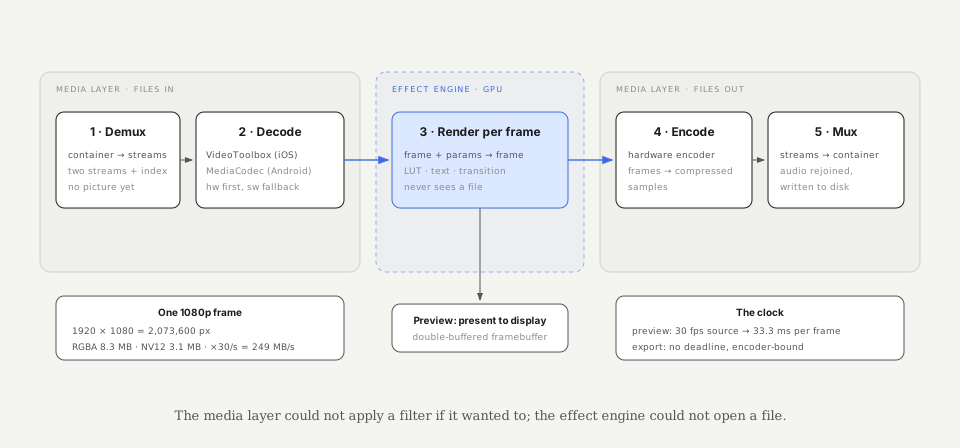
The media engine advances playback and manages decoding and encoding. The rendering engine applies effects and composites visual layers. Audio properties, such as volume, feed the corresponding audio-processing path.
A useful boundary is to evaluate animation before rendering and pass final property values with the frame. The renderer consumes those values; it does not apply the easing a second time.
The evaluation path is small enough to describe precisely:
- Convert the output-frame index to its agreed timestamp.
- Map timeline time to the animation's clock.
- Find the two surrounding keyframes; outside the range, use the defined endpoint behavior.
- Normalize time within the segment and evaluate its easing curve.
- Interpolate according to the property's semantics, then apply any required limits.
The curve editor may draw the Bézier geometry directly from its control points. Its playhead marker and displayed property value should use the evaluator. Preview may drop frames for responsiveness, but a frame it does render should use the same value as export at that timestamp.
“Interpolation” is also property-specific. Position can interpolate in normalized canvas coordinates. Positive scale can interpolate in log space when proportional change is the intended behavior; zero or negative scale needs a separate policy. Rotation should preserve unwrapped angles if 0° to 360° is meant to complete a full turn. Opacity may clamp to [0, 1], while position should retain overshoot. Discrete properties need a defined step boundary rather than a fabricated intermediate state.
Agree on the frame before agreeing on the value
Represent media timestamps as rational numbers—an integer value and a timescale—and define a single sampling rule. For constant-rate output, sampling the start of frame n gives:
Integer rational arithmetic avoids repeated floating-point accumulation and makes equivalent frame boundaries comparable. It still needs overflow handling, consistent rescaling, and rounding policies. Curve evaluation and arbitrary retiming can remain numerical operations with explicitly bounded error.
Source media may have variable frame durations, so output-frame indices and source-frame indices are not interchangeable. Use source presentation timestamps when snapping to source frames. For exact-keyframe UI detection, compare normalized rational timestamps or a canonical sample identity—not independently rounded floating-point seconds.
Splitting a curve without changing the motion
Suppose a clip is split between two keyframes. Inserting a new keyframe with the correct value at the cut does not preserve the animation by itself. Reusing the original easing on each shortened segment restarts its normalized time and changes the motion on both sides.
One safe representation retains the original curve and restricts each clip to a different source interval. If each clip must own independent segments, subdivide the curve.
First convert the cut's normalized time xs into the Bézier parameter us by solving . Then apply de Casteljau subdivision:
Define . Each level interpolates the previous level at the same parameter :
The left curve has control points ; the right curve has .
The two pieces trace the original geometry. To store them as normalized easing segments, remap each piece's x and y coordinates relative to that piece's endpoints. The new boundary value comes from the original evaluator. This transformation must happen in the property's interpolation space—for example, log scale rather than an already clamped displayed value. If a subdivided curve cannot fit the schema's allowed control-point ranges, retain an interval-based representation; clamping its new handles would change the motion.
There is an important degenerate case: equal endpoint values do not prove the segment is constant. An overshooting curve can leave a value and return to it. If a piece has zero vertical span, dividing by that span is invalid, and replacing it with a linear constant segment loses the excursion. Preserve the original curve with its parameter interval, store an absolute-value spline, or subdivide into a representation that can retain the excursion. Only use a constant segment after establishing that the whole piece is constant.
Splits at existing keyframes can reuse the boundary directly. Zero-duration segments and duplicate timestamps need a deterministic policy before they reach interpolation.
A draft must carry its meaning
Saving four control-point numbers is not enough. A draft schema must also define the clock, property units, interpolation space, defaults, and segment ownership.
{
  "keyframeSchema": 2,
  "clock": "source",
  "property": "scale",
  "interpolation": "log",
  "keys": [
    {
      "t": { "value": 0, "timescale": 600 },
      "value": 1.0,
      "outgoingEase": { "type": "cubic", "points": [0.42, 0, 0.58, 1] }
    },
    {
      "t": { "value": 1800, "timescale": 600 },
      "value": 1.5
    }
  ]
}
Here the easing belongs to the segment leaving a keyframe. A missing easing defaults to linear; the last keyframe has no outgoing segment. State how malformed or non-finite numbers are handled, whether out-of-range x coordinates are rejected or clamped, and how duplicate timestamps resolve. Every reader must apply the same policy.
Version the semantics as well as the structure. Adding an explicit linear easing to an older draft is safe only if it reproduces that version's behavior. Do not silently switch an existing scale animation from linear to logarithmic interpolation during migration.
For older clients that cannot evaluate cubic easing, one fallback is to bake final values at a declared frame cadence. This can preserve values at those exact sample times when the old client uses compatible clocks and property semantics. It does not guarantee identical interpolation between samples, or after a frame-rate change or further retiming. Baking also increases draft size and loses the original editable curve. Unsupported combinations should open read-only or offer an explicit conversion, rather than silently change the animation.
Roll out compatible engine readers first, then enable writers of the new schema. A schema version and evaluator version make failures traceable to a concrete contract.
Test the contract at four levels
The evaluator: share golden input/output vectors across platforms. Cover endpoints, linear curves, flat tangents, overshoot, nearly coincident timestamps, and invalid data. Define tolerances for the resulting property values; identical source code alone does not promise bit-for-bit floating-point equality across compilers and architectures.
Editing operations: generate curves and sequences of splits, trims, retimes, and reversals. Compare retained source samples before and after each operation, according to the declared anchoring policy. Include repeated splits and zero-span subcurves—the cases most likely to defeat a handful of happy-path examples.
Preview and export: compare timestamped property-value logs first. They identify the first divergent frame and property cheaply. Then compare selected rendered frames with a justified pixel tolerance. Matching parameters is necessary, but color management, effect implementations, and render precision can still produce different pixels.
Compatibility: open old draft fixtures in new readers, round-trip supported schemas, and test any baking fallback at its declared cadence. Record schema and evaluator versions with diagnostic events without collecting the user's draft contents.
The practical outcome is a small set of explicit agreements: one clock model, one evaluation path, one sampling policy, and a versioned description of the animation. Once those agreements are shared, the curve the user edits can survive a cut, a preview, and an export without acquiring a different meaning along the way.