What Happens If You Do Not Reuse
Cell reuse is usually the first piece of real framework design a new iOS developer meets. It tends to be taught as a rule: "always dequeue, never create cells yourself." Rules learned that way are followed but not understood, and the misunderstandings resurface later as reuse bugs. So this article takes the opposite route: start from zero, with no table view at all, and let the design force itself on us.
Forget UITableView for a moment. Suppose you were asked to display a list of 1,000 contacts and had never heard of cell reuse. The obvious implementation is a UIScrollView with one row view per item:
let rowHeight: CGFloat = 56

for (index, item) in items.enumerated() {
    let row = RowView(item: item)
    row.frame = CGRect(x: 0,
                       y: CGFloat(index) * rowHeight,
                       width: scrollView.bounds.width,
                       height: rowHeight)
    scrollView.addSubview(row)
}

scrollView.contentSize = CGSize(width: scrollView.bounds.width,
                                height: CGFloat(items.count) * rowHeight)
This works. It scrolls. And it pays three bills that grow with the data:
- Memory. All 1,000 row views are alive at once, each with its labels, image views, and backing layers, even though a phone screen shows about a dozen.
- Creation cost. Before the first frame appears, the app allocates, configures, and lays out 1,000 views. The list gets slower to open as the data grows, which is exactly backwards.
- Waste. At any instant, roughly 99% of those views are outside the screen doing nothing. They cannot be seen, but they still occupy memory and participate in the view hierarchy.
Now the observation that motivates everything else: the Contacts app scrolls through thousands of entries with no lag and no memory spike. So UIKit is clearly not doing this. The question is what it does instead.
The Screen Is a Window
The fix begins with a change of perspective. The data has 1,000 rows, but the screen can only show bounds.height / rowHeight of them, about twelve on a 4.7-inch phone at 56 points per row. The screen is a small window sliding over a long list.
If only twelve rows are visible, only about twelve row views are ever needed. The cells are actors; the data is the script. A theater does not hire one actor per line of dialogue. It hires enough actors to cover the roles on stage, and as the play advances, the same actor comes back out as a different character.
That is the entire idea. Everything else is bookkeeping:
- Keep a set of visible cells, one per on-screen row.
- When a cell scrolls completely out of the window, do not destroy it. Put it in a reuse pool.
- When a new row is about to scroll in, first ask the pool. Only create a new cell if the pool is empty.
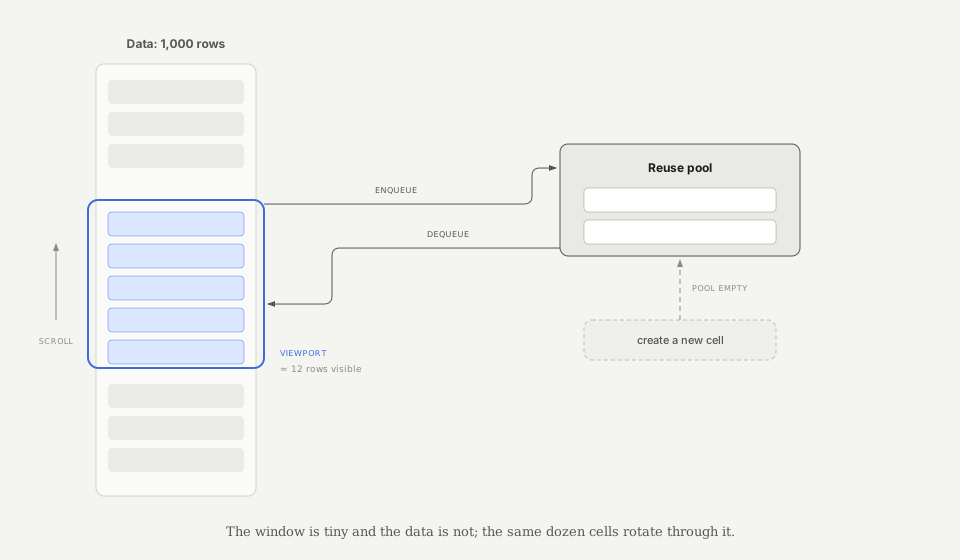 Cells leaving the visible window enter the reuse pool; entering rows dequeue those cells before allocating new ones.
Once the window is full and the pool holds one or two spares, creation stops entirely. You can scroll through all 1,000 rows and the number of live cells never changes. Memory is proportional to the screen, not to the data.
One Frame of Scrolling, Step by Step
To make the mechanism concrete, here is what happens inside a single scroll frame:
- The user drags;
contentOffset.ychanges. - From the offset and the row height, the table computes the currently visible index range.
- Any cell whose row has left that range is detached from the visible set and appended to the reuse pool.
- Any row that has entered the range needs a cell: the table asks the pool first, and only allocates when the pool comes up empty.
- The dequeued cell gets the new row's data, a new frame, and joins the visible set.
The pool is not one undifferentiated bin. Cells are bucketed by reuseIdentifier. A feed with text rows, photo rows, and ad rows keeps three buckets, so a photo cell is never handed to a text row. The identifier is the contract that says "any cell in this bucket can play any row of this kind."
Two consequences fall out of this model, and both are observable in a real app:
- Steady state. After the first screen, cell creation happens only when a row kind appears for the first time or when scrolling is so fast that the pool momentarily runs dry. Scrolling for an hour creates roughly nothing.
- Cells are shared property. A cell you configured for row 3 will later show row 40. Whatever state row 3 left behind is still on that cell when row 40 receives it. This is the price of reuse, and the second half of this article is about paying it correctly.
Two Generations of dequeue, One Pool
The public API changed shape over the years, and comparing the two forms is a nice way to confirm the model.
Before iOS 6, the pool was exposed directly. Dequeue could fail, and handling the miss was your job:
var cell = tableView.dequeueReusableCell(withIdentifier: "Row")
if cell == nil {
    cell = UITableViewCell(style: .subtitle, reuseIdentifier: "Row")
}
The modern form registers the cell type up front, and dequeue is guaranteed to succeed:
tableView.register(RowCell.self, forCellReuseIdentifier: "Row")

let cell = tableView.dequeueReusableCell(withIdentifier: "Row",
                                         for: indexPath)
Nothing about the pool changed between these two APIs. What changed is who owns the miss: registration tells the table how to construct a cell for each identifier, so the framework can absorb the nil case instead of leaking it to every data source in every app. When you see both forms, read them as the same machine with the hood at different heights.
Building a MiniTableView
Reading about a mechanism is one level of understanding. Rebuilding it is another. Here is a minimal reusing list in Swift 4: fixed row height, single cell kind, no sections. It is a UIScrollView plus exactly the bookkeeping from the frame-by-frame walkthrough above.
protocol MiniTableViewDataSource: AnyObject {
    func numberOfRows(in tableView: MiniTableView) -> Int
    func tableView(_ tableView: MiniTableView,
                   configure cell: MiniCell,
                   forRow row: Int)
}

final class MiniTableView: UIScrollView {
    weak var dataSource: MiniTableViewDataSource?
    var rowHeight: CGFloat = 56

    private var visibleCells: [Int: MiniCell] = [:]
    private var reusePool: [MiniCell] = []
    private(set) var createdCellCount = 0

    func reloadData() {
        visibleCells.values.forEach { $0.removeFromSuperview() }
        visibleCells.removeAll()
        reusePool.removeAll()

        let rows = dataSource?.numberOfRows(in: self) ?? 0
        contentSize = CGSize(width: bounds.width,
                             height: CGFloat(rows) * rowHeight)
        setNeedsLayout()
    }

    override func layoutSubviews() {
        super.layoutSubviews()
        guard let dataSource = dataSource else { return }

        let rowCount = dataSource.numberOfRows(in: self)
        guard rowCount > 0 else { return }

        let contentBounds = CGRect(origin: .zero, size: contentSize)
        let visibleRect = bounds.intersection(contentBounds)
        guard !visibleRect.isNull, visibleRect.height > 0 else { return }

        let firstVisible = min(
            rowCount - 1,
            max(0, Int(floor(visibleRect.minY / rowHeight)))
        )
        let lastVisible = min(
            rowCount - 1,
            max(firstVisible,
                Int(floor((visibleRect.maxY - .ulpOfOne) / rowHeight)))
        )

        // 1. Cells whose rows left the window go back to the pool.
        let rowsLeavingWindow = visibleCells.keys.filter {
            $0 < firstVisible || $0 > lastVisible
        }
        for row in rowsLeavingWindow {
            guard let cell = visibleCells.removeValue(forKey: row) else {
                continue
            }
            cell.removeFromSuperview()
            reusePool.append(cell)
        }

        // 2. Rows that entered the window ask the pool first.
        for row in firstVisible...lastVisible where visibleCells[row] == nil {
            let cell = dequeue()
            cell.frame = CGRect(x: 0,
                                y: CGFloat(row) * rowHeight,
                                width: bounds.width,
                                height: rowHeight)
            dataSource.tableView(self, configure: cell, forRow: row)
            addSubview(cell)
            visibleCells[row] = cell
        }
    }

    private func dequeue() -> MiniCell {
        if let cell = reusePool.popLast() {
            cell.prepareForReuse()
            return cell
        }
        createdCellCount += 1
        return MiniCell()
    }
}
That is the whole thing. One dictionary for the stage, one array for the backstage, and a dequeue() that prefers the pool. The createdCellCount property exists purely to make the claim from earlier falsifiable.
A representative run with a 1,000-row data source on an iPhone 8 produced the following log. Exact counts vary with viewport size and scroll behavior; the invariant to check is that creation plateaus instead of growing with the row count.
row 0    created: 13
row 87   created: 14
row 412  created: 14
row 999  created: 14
Thirteen cells to fill the first screen, one more created during a fast flick when the pool was momentarily empty, and then nothing for the remaining 986 rows. The steady state is real, and now it is your steady state, not a diagram in a document.
The production UITableView is this skeleton plus everything I deliberately left out: per-identifier pool buckets, sections and their headers, variable and self-sizing row heights with a height cache, selection and editing state, animations. UIKit's source is not public, but Chameleon, an open-source reimplementation of UIKit for the Mac, follows the same broad structure: cells leaving the visible region become candidates for reuse instead of being destroyed and recreated.
The Price of Reuse: State Leaks
The pool gives you constant memory, and it charges for that in a new failure mode. A dequeued cell is not blank. It arrives carrying whatever the previous row left on it, and every classic reuse bug is this one fact wearing different clothes:
- A checkmark set on row 3 reappears on row 40.
- An expanded row causes some other row, screens away, to appear expanded.
- A photo flashes with the previous row's image before the right one loads.
The first line of defense is prepareForReuse, which the cell receives right before being handed out again:
override func prepareForReuse() {
    super.prepareForReuse()
    avatarView.image = nil
    accessoryType = .none
}
Its job is narrow: reset visual state to a neutral baseline. It is not the place for data logic, because the cell does not yet know which row it is about to become. Configuration belongs to the data source, which does know.
The sharpest version of the state leak involves asynchrony. Row 3 starts an avatar download. The user flicks; the cell is recycled to row 40; the download for row 3 completes and happily sets its image on what is now row 40's cell. The fix is to make the cell remember which request it currently represents, and to check before applying:
func tableView(_ tableView: UITableView,
               cellForRowAt indexPath: IndexPath) -> UITableViewCell {
    let cell = tableView.dequeueReusableCell(withIdentifier: "Row",
                                             for: indexPath) as! RowCell
    let item = items[indexPath.row]

    cell.representedURL = item.avatarURL
    imageLoader.load(item.avatarURL) { [weak cell] url, image in
        guard let cell = cell, cell.representedURL == url else {
            return   // the cell has moved on to another row
        }
        cell.avatarView.image = image
    }
    return cell
}
The guard is the reuse model showing through the API: a cell is not permanently attached to a row, so any callback that captured a cell must re-verify the relationship when it fires. Once you have built the MiniTableView, this bug stops being mysterious. Of course the image landed on row 40; you watched dequeue() hand the same object to a different row.
What Reuse Solves, and What It Does Not
It is worth drawing the boundary of the mechanism precisely.
Reuse eliminates per-row creation cost and data-proportional memory. It is why a list can be effectively infinite. It does nothing about the other sources of scroll jank: expensive row height calculation, heavy cellForRow configuration, offscreen rendering from shadows and corner radii, or synchronous disk and network work on the main thread. A table view can reuse perfectly and still drop frames because each configuration pass decodes a full-size image.
The same "prepare before it is needed" instinct behind the pool shows up elsewhere in the API. estimatedRowHeight lets the table defer exact height work until a row is close to appearing. The prefetching API from iOS 10 asks the data source to start fetching content for rows near the window before they enter it. The pool, estimation, and prefetching are one philosophy applied to three different costs: the window is small, so spend only near the window.
Takeaway
Cell reuse is not a clever feature bolted onto UITableView. It is the inevitable design once you notice one fact: the window is tiny and the data is not, so the number of views should follow the window.
Everything in the public API is a shadow of that fact. reuseIdentifier names a bucket of interchangeable actors. dequeue prefers backstage to the costume shop. prepareForReuse wipes the makeup. The async-image guard exists because actors change roles mid-callback. Sixty lines of UIScrollView bookkeeping are enough to reproduce all of it, and after writing them once, none of the API's rules need to be memorized again. They are just what the window model requires.