The Page That Scrolled Twice
The page looked simple in the design file. A banner area sat on top: promotional slots whose content came from an operations backend. The content list filled everything below it. The intended feel was one continuous surface: scroll down, the banner slides away, and from then on you are simply scrolling the content.
Structurally, it was a table view nested inside a table view:
- A container table view owned the page. Its upper region rendered the banner slots; its lower region was a single cell, one viewport tall.
- Inside that cell lived the content table view: the actual list, with its own cells and its own pagination.
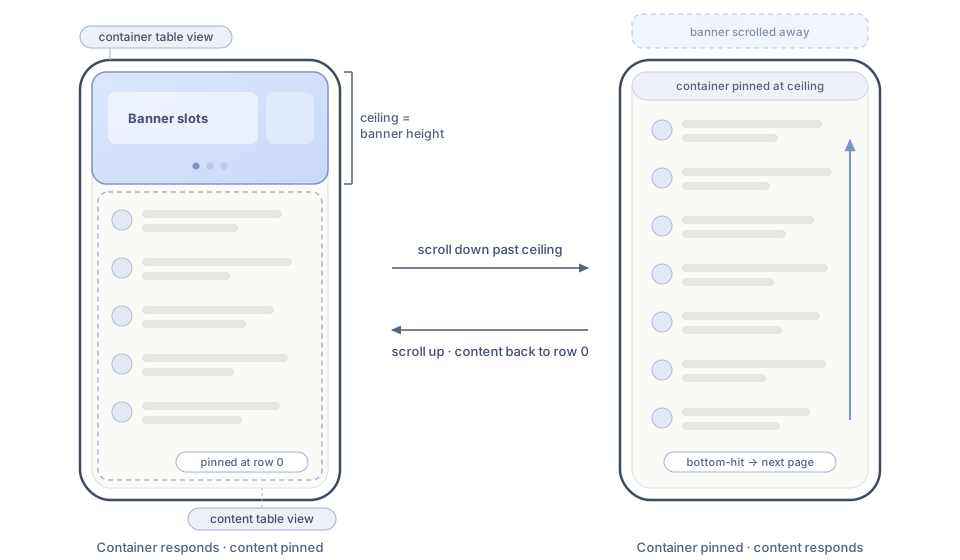 Before the banner ceiling, the container moves and the content list stays pinned; after the ceiling, ownership reverses.
The left screen is the page as it opens: the banner occupies the top, the content list is pinned at its first row, and dragging anywhere scrolls the container. The right screen is the same page after scrolling past the banner: the container is pinned, and the same drag now scrolls the content rows. The height of the banner, labeled ceiling, is the boundary this entire article revolves around.
Both table views respond to exactly the same gesture: a vertical pan. UIKit has no idea which one the user means, and the default resolution produced two distinct problems that this article walks through:
- Gesture ownership. Once the banner has scrolled away, the container must stop moving and only the content may scroll; otherwise the page reads as two lists fighting each other. And the handoff must survive the deceleration of a slow flick without a visible seam.
- Load arbitration. Three data loads fed this one page: the banner slot data, a whole-page pull-to-refresh, and the content list's bottom-hit pagination. When they overlapped, they corrupted each other's assumptions.
The second problem turned out to depend on the first. Until the page knew which table view owned a gesture, it could not decide which load that gesture was allowed to trigger.
Part One: The Gesture Conflict
What the Default Behavior Does
By default, UIKit resolves competing pan recognizers by letting one win. Wherever the touch lands, that view scrolls and the other freezes:
- Finger on the content list while the banner is still visible: the content rows scroll underneath a stationary banner. The user has not dismissed the banner, yet the list beneath it is already halfway down its data.
- Finger on the banner: the container scrolls, and can keep scrolling past the point where the banner is gone, dragging the content cell around as a dead rectangle while the rows inside it stay put.
Either way the page state stops corresponding to anything the user did on purpose. The reports all reduced to the same word: confusing. What the design wanted was strict sequencing: first the banner collapses, then the content scrolls, and past the boundary the container must not move at all.
There was a second, subtler failure at the boundary itself, visible during slow flicks. A gentle swipe ends with the finger lifting while the content still carries deceleration velocity. That momentum belongs to whichever view recognized the pan. When that view reaches its own limit (the container arriving at the banner's edge, or the content list at row zero), the leftover velocity has nowhere to go. It rubber-bands against its own edge and dies there instead of continuing into the other view. Fast swipes hid this because the bounce read as intentional. Slow swipes made the page overshoot, wobble, and settle somewhere that did not match the gesture.
Let Both Recognize, Then Choose Who Responds
The fix was to stop asking UIKit to pick a winner. The container table view got a dedicated gesture-cooperation method: the delegate hook that lets its pan recognize simultaneously with the content list's pan.
final class PageContainerTableView: UITableView, UIGestureRecognizerDelegate {
    func gestureRecognizer(
        _ gestureRecognizer: UIGestureRecognizer,
        shouldRecognizeSimultaneouslyWith other: UIGestureRecognizer
    ) -> Bool {
        // Cooperate only with our own embedded content list,
        // not with sliders, swipe-to-delete, or anything else inside cells.
        other.view is ContentTableView
    }
}
Now every vertical drag drives both table views at once. Left alone, that is worse: banner and content scroll together. The second half of the technique is a coordinator that decides, on every frame, which view is allowed to respond and pins the other one.
The rule needs one number: the container offset at which the banner has fully scrolled away. That is simply the banner height, and I call it the ceiling.
var ceilingOffset: CGFloat {
    bannerHeight   // derived from the slot data; more on this in Part Two
}
Ownership is then a single invariant:
The container scrolls in
[0, ceiling]. The content list scrolls only while the container is pinned at the ceiling. Before that, the content is ignored; after that, the container is ignored.
extension HomePageViewController: UIScrollViewDelegate {
    func scrollViewDidScroll(_ scrollView: UIScrollView) {
        if scrollView === containerTableView {
            if scrollState.contentOwnsScrolling {
                // Past the banner: ignore the container, hold it at the ceiling.
                containerTableView.contentOffset.y = ceilingOffset
            } else if containerTableView.contentOffset.y >= ceilingOffset {
                // The banner just finished collapsing; hand over.
                containerTableView.contentOffset.y = ceilingOffset
                scrollState.contentOwnsScrolling = true
            }
        } else if scrollView === contentTableView {
            if !scrollState.contentOwnsScrolling {
                // Banner still visible: ignore the content list, keep it at row zero.
                contentTableView.contentOffset = .zero
            } else if contentTableView.contentOffset.y <= 0 {
                // Scrolling up: the content returned to its top; hand back.
                contentTableView.contentOffset = .zero
                scrollState.contentOwnsScrolling = false
            }
        }
    }
}
The downward direction collapses the banner first, then scrolls the content. The upward direction is the mirror image: the content scrolls back to its first row, ownership flips, and only then does the container move to reveal the banner again. These are exactly the two screens in the figure at the top of the article, and the two arrows between them are these two code paths.
Two details keep this coordinator small. Setting contentOffset directly (not the animated variant) inside scrollViewDidScroll stabilizes at the pinned value, and the state changes only at the two boundary crossings. The sample assumes zero adjusted content insets; production code must derive each logical top from -adjustedContentInset.top rather than hard-coding .zero.
Momentum Handoff Is a Separate Requirement
Simultaneous recognition solves gesture arbitration, but it does not by itself guarantee a seamless momentum handoff.
Both pan recognizers observe the same finger velocity. The two scroll views still own separate content bounds, insets, bounce behavior, and internal deceleration state. Repeatedly pinning one view's contentOffset may also stop or alter its deceleration. UIKit does not promise that the hidden view will keep an identical curve ready to reveal later.
The timeline below is therefore the behavior we wanted, not a guarantee supplied by simultaneous recognition:
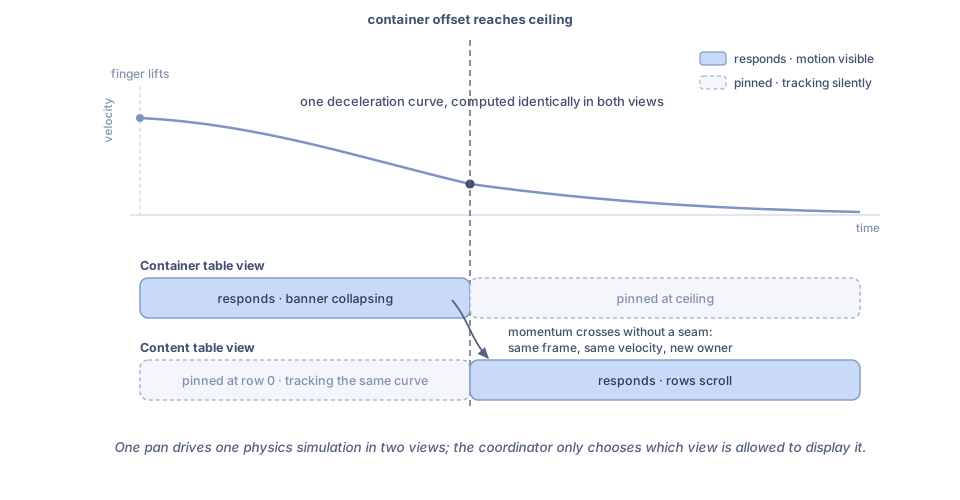 The visible motion should preserve velocity at the handoff, even though the two scroll views do not share one guaranteed physics simulation.
We verified the basic ownership coordinator on the devices and OS versions used by the original page, then treated slow-flick continuity as a separate device-level test. Where pinning did not preserve momentum, the robust alternatives were to capture the outgoing pan velocity and drive one explicit animator across the boundary, or to redesign the page around one outer scrolling surface so only one deceleration engine existed. The article's coordinator expresses ownership; it should not be mistaken for a general-purpose physics transfer API.
Three configuration details rounded it out:
- Both views were given the same
decelerationRate. A mismatch is visible as a change of friction exactly at the handoff frame. - The content list's top bounce was disabled. The container owns the top rubber band (that is where the whole-page pull-to-refresh lives), and two competing bounces read as a stutter.
- The content list kept its bottom bounce, because its bottom-hit pagination lives there.
Part Two: Three Loads, One Winner
With ownership defined, the second problem had a vocabulary. Three data loads fed the page:
- Slot data. On entry, fetch the banner placements: which promotions occupy the slots, and therefore how tall the banner area is.
- Pull-to-refresh. The merged banner-plus-content page has one pull-down refresh at its top. It refetches the slot data and the first page of content together. The content list deliberately has no refresh control of its own.
- Bottom-hit pagination. When the content list's last rows approach, request the next page and append it.
Individually each was routine. Together they raced, and each race had its own flavor:
- A refresh while a next-page request was in flight produced the classic interleaving: the refresh reset the list to page one, then the stale append landed on top of it, producing page one followed by page N.
- The bottom-hit trigger is not a single event. It is evaluated from scroll callbacks, and near the bottom of the list those fire on every frame, including the bounce frames after the user lets go. Without protection, one gesture at the end of the list queued the same next page three or four times.
- The slot data was the strangest one, because its payload changes the banner height, which is the gesture ceiling. A late-arriving slot response could grow or shrink the banner while the user was mid-scroll, moving the boundary underneath an active gesture and visibly shifting the content.
Priority Follows Blast Radius
The arbitration rule that survived is easy to state: a load's priority is proportional to how much of the page it invalidates.
| # | Load | Mutates | Rule |
|---|---|---|---|
| 1 | Pull-to-refresh | Replaces slots and content, resets both offsets | Highest; cancels everything in flight |
| 2 | Slot data | Changes banner height, therefore the ceiling | Applied only at a safe moment; folded into refresh |
| 3 | Bottom-hit pagination | Appends to the content list | Single-flight; dropped while a refresh runs |
The rules in behavior:
- Refresh is the founding event. While it is in flight, every other trigger is disabled and any in-flight slot or page request is cancelled; the refresh will refetch both anyway. Nothing may append to a list that is about to be replaced.
- Pagination is single-flight. The first bottom-hit starts the request; every re-evaluation from the following scroll frames is rejected, not queued. A rejected trigger costs nothing, because the in-flight request is already fetching exactly the page the user is waiting for. The gate reopens only after the response is applied, so "next page" can never mean "the same page twice."
- Slot data never moves the ground under the user. The response is accepted immediately, but applying it (resizing the banner, re-deriving the ceiling) waits for a safe moment: the container owns scrolling and sits near the top, or the update arrives inside a refresh where the whole page resets anyway. If the content list owns scrolling when the slots land, the new height is held until the user scrolls back above the boundary.
A small arbiter made the policy explicit instead of scattering it across the scroll callbacks:
enum PageLoad: Hashable {
    case refresh
    case slots
    case nextPage
}

struct LoadToken: Equatable {
    let load: PageLoad
    let generation: Int
}

enum LoadDecision: Equatable {
    case start(LoadToken)
    case startCancellingCurrent(LoadToken)
    case reject
}

final class LoadArbiter {
    private var nextGeneration = 0
    private var active: [PageLoad: LoadToken] = [:]

    func request(_ load: PageLoad) -> LoadDecision {
        switch load {
        case .refresh:
            active.removeAll()
            let token = makeToken(for: .refresh)
            active[.refresh] = token
            return .startCancellingCurrent(token)

        case .slots:
            guard active[.refresh] == nil, active[.slots] == nil else {
                return .reject
            }
            let token = makeToken(for: .slots)
            active[.slots] = token
            return .start(token)

        case .nextPage:
            guard active[.refresh] == nil, active[.nextPage] == nil else {
                return .reject
            }
            let token = makeToken(for: .nextPage)
            active[.nextPage] = token
            return .start(token)
        }
    }

    func complete(_ token: LoadToken) -> Bool {
        guard active[token.load] == token else { return false }
        active[token.load] = nil
        return true
    }

    private func makeToken(for load: PageLoad) -> LoadToken {
        nextGeneration += 1
        return LoadToken(load: load, generation: nextGeneration)
    }
}
Every completion handler carries the returned token and applies its response only when complete(_:) returns true. Starting a refresh clears the previous tokens before issuing a new one, so a cancelled next-page response cannot append to a freshly refreshed list even if its bytes arrive late.
Gesture Ownership Gates the Triggers
The two halves of this article meet in one place. Both scroll-driven loads misfire without ownership information:
- Pull-to-refresh arms only while the container owns the gesture and sits at its top. The same downward drag while the content list owns scrolling means "scroll the rows back up"; since the content list has no refresh control, there is exactly one way to refresh the page and it requires the banner to be visible. Users found this matches intuition: you refresh the page, from the top of the page.
- The bottom-hit trigger arms only while the content list owns scrolling. Before the handoff, the content list is pinned at row zero and its scroll callbacks are the coordinator's pinning writes, not user intent. Evaluating the pagination trigger during those frames would fire it spuriously; gating on ownership means the trigger only sees offsets the user actually produced.
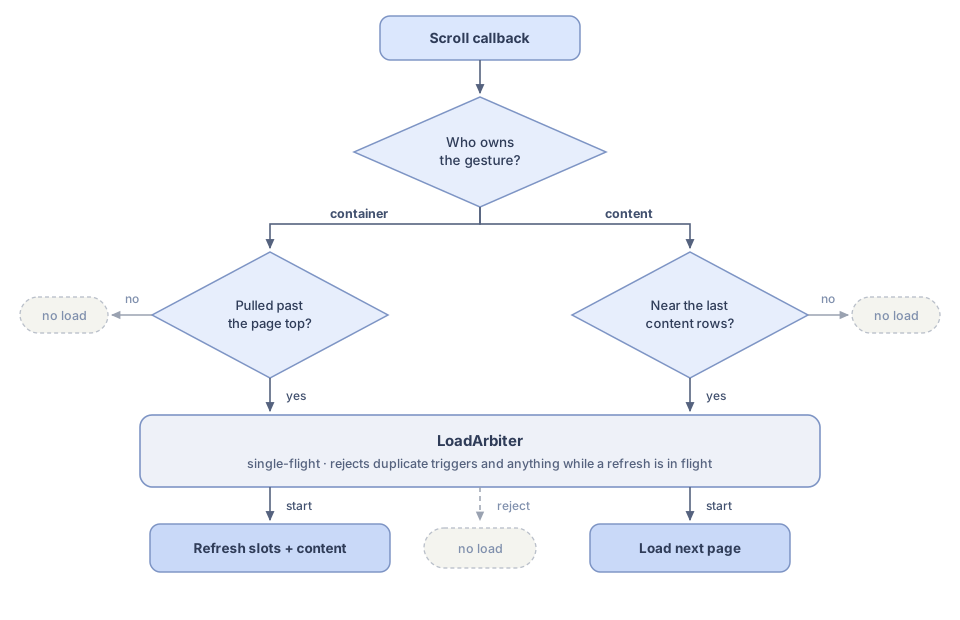 Container-owned gestures may refresh; content-owned gestures may paginate; both requests pass through the same load arbiter.
Reading it top to bottom: ownership splits the callback into two independent paths, each path has exactly one edge condition, and every request funnels through the arbiter band before any network call starts. The grey exits are the important part: most scroll callbacks end in "no load," and that is precisely what keeps the loads from racing.
And the dependency runs the other way too. The ceiling that the gesture coordinator pins against is derived from the slot data: the banner is as tall as the placements the operations backend returned. That is why ceilingOffset is a computed property rather than a stored constant: when the slot response is applied, the boundary moves, and the next scroll callback pins against the new value. The gesture system consumes the data system's output, and the data system's triggers are gated by the gesture system's state. Neither is designed correctly in isolation.
Testing the Policy Without a Screen
Because the arbiter is a pure state machine, the priority rules became table tests rather than UI tests:
func testRefreshCancelsInFlightNextPage() {
    let arbiter = LoadArbiter()
    guard case let .start(pageToken) = arbiter.request(.nextPage) else {
        return XCTFail("Expected pagination to start")
    }

    guard case .startCancellingCurrent = arbiter.request(.refresh) else {
        return XCTFail("Expected refresh to supersede pagination")
    }
    XCTAssertFalse(arbiter.complete(pageToken))
}

func testRepeatedBottomHitIsAbsorbed() {
    let arbiter = LoadArbiter()
    _ = arbiter.request(.nextPage)

    // Bounce frames re-evaluate the trigger; only one request may fly.
    XCTAssertEqual(arbiter.request(.nextPage), .reject)
    XCTAssertEqual(arbiter.request(.nextPage), .reject)
}

func testSlotsAreFoldedIntoRefresh() {
    let arbiter = LoadArbiter()
    _ = arbiter.request(.refresh)

    XCTAssertEqual(arbiter.request(.slots), .reject)
}
The ownership coordinator got the same treatment: given a container offset, a content offset, and the current owner, assert the next owner and the pinned values. No table view required.
Tradeoffs
The simultaneous-recognition approach is not free. The coordinator runs on every scrollViewDidScroll callback, so it must stay allocation-free and branch-cheap. The shouldRecognizeSimultaneouslyWith check has to be narrow; returning true unconditionally re-breaks horizontal swipes and controls inside cells, which is why the container matches only its own embedded content list type.
The load policy also chooses dropping over queueing. A rejected trigger is simply ignored; if a request fails, the user scrolls or pulls again. Queueing stale triggers felt responsive in demos and wrong in use: by the time a queued load ran, the list had moved on and the response answered a question nobody was still asking.
And deferring the slot application is a real product tradeoff. A banner that grew while the user was reading the list would have been more "up to date," but every variant we tried read as the page jumping on its own. Holding the new height until the user returns to the top traded a little freshness for a page that never moves except in response to a gesture. Nobody ever filed a report about the freshness.
Takeaway
Two ideas carried this page, and both are about making an implicit decision explicit.
The gesture conflict dissolved once the question changed from "which table view wins the pan?" to "both track the pan; which one is allowed to respond right now?" One boundary value, one ownership flag, and per-frame pinning gave the page strict sequencing (banner first, content after), and running the same deceleration in both views is what let slow flicks cross the boundary without a seam.
The loading chaos dissolved once every request had to pass a single arbiter whose priority order followed blast radius: the load that replaces the page outranks the load that reshapes it, which outranks the load that merely extends it. The arbiter's inputs came from the gesture coordinator, and the coordinator's boundary came from the arbiter's data, because on a page with two table views, you cannot decide what to load until you know who was scrolling, and you cannot know who should scroll until the data has told you where the boundary is.